How to add water to a calorimeter
The calorimeter plays a key role in various types of calorific value detection work, and adding water to the calorimeter is an important part of ensuring its accurate operation. Here is a detailed introduction to the standard water addition method.
Preparation before adding water
Before adding water, turn off the power of the calorimeter to ensure safe operation and avoid the risk of electric shock. At the same time, prepare clean distilled or deionized water, which is pure and can effectively avoid impurities from affecting the test results of the calorimeter. In addition, prepare a clean measuring cup for accurate water intake.
The operation steps of accurately adding water
1. Find the water filling port: Different models of calorimeters may have different positions of the water filling port. Common ones are the outer bucket water filling port and the inner bucket water filling port. Usually, the outer bucket water filling port is located on the side or top of the instrument, and the inner bucket water filling port needs to open the specific cover of the instrument to find it. After finding the water filling port, carefully clean the surrounding dust to prevent debris from falling in.
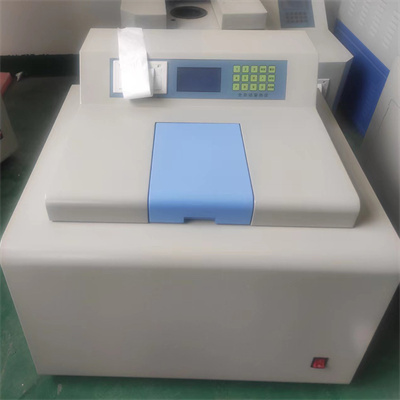
2. Control the amount of water added: strictly follow the instruction manual of the calorimeter to determine the amount of water added. Generally speaking, the amount of water added to the outer bucket needs to reach the water level scale, and the amount of water added to the inner bucket needs to be accurately controlled according to the experimental needs. Use a measuring cup to add water slowly, and observe the water level while adding to avoid adding too much or too little water.
3. Smooth water addition: Pour the water in the measuring cup slowly and smoothly into the water filling port to avoid excessive splashing of water and prevent splashing on the internal circuit of the instrument. During the water addition process, always pay attention to the water level changes to ensure that the specified scale is met.
Inspection matters after adding water
After adding water, check whether the water level is accurate again. After confirming that it is correct, cover and tighten the water inlet to prevent water evaporation or external impurities from entering. Then, turn on the power supply of the calorimeter, perform simple preheating and debugging, observe whether the instrument is running normally, and ensure that the water addition operation is correct.
Key considerations for adding water
- Strict water quality requirements: Be sure to use purified water, and it is strictly forbidden to use tap water or water containing impurities to avoid scale clogging pipes or affecting test results.
- Operation safety first: Power must be cut off before adding water, and avoid touching the charged parts of the instrument during operation to ensure personal safety.
- Regular maintenance and inspection: Regularly check the water level sensor and water filling pipe of the calorimeter to ensure that it is unobstructed, clean up scale and debris in time, and ensure the long-term stable operation of the calorimeter.
Mastering the correct method of adding water to the calorimeter can not only ensure the accuracy of the experimental data, but also prolong the service life of the instrument. Strictly follow the above steps and precautions to keep the calorimeter in the best working condition.
 How to read calorimeter data
 What is the design principle of a calorimeter?
 What is the harm of lack of water in the calorimeter?
 What is the input interface of the calorimeter?