How to change paper in a calorimeter
First, preparation: ensure safe and accurate operation
Before replacing the calorimeter paper, be sure to turn off the power of the instrument to avoid the risk of electric shock, and at the same time let the instrument cool sufficiently to prevent high temperature burns. Prepare the special paper suitable for this type of calorimeter to ensure that the paper specifications and materials meet the requirements of the instrument, and inferior paper will affect the test results. Also prepare clean tweezers and a dust-free cloth for wiping to keep the operating environment clean to avoid dust and debris mixing into the inside of the instrument and affecting subsequent operation.
Second, open the instrument parts: accurately locate the installation position of the paper sheet
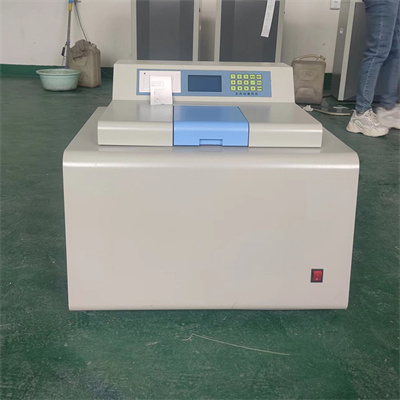
Follow the instruction manual of the calorimeter to find the installation compartment location of the paper. The installation compartment structure of different models of calorimeters is slightly different. Some need to open the inspection cover on the side of the instrument, and some need to remove the protective panel on the top. During the opening process, the action should be gentle to avoid pulling the circuit hard or damaging the instrument shell. At the same time, pay attention to the disassembly sequence of the parts for subsequent recovery.
Third, take out the old paper: standardize the operation to avoid residue
Use tweezers to gently clamp the edge of the old paper sheet and slowly remove it from the installation compartment. Do not touch it directly to prevent sweat and stains on your hands from contaminating the instrument. After taking it out, carefully check whether there are any paper fragments left in the installation compartment. If so, gently wipe and clean it with a dust-free cloth to ensure that there are no sundries in the installation compartment to avoid affecting the installation of the new paper sheet and the normal operation of the instrument.
IV. Install new paper: ensure fit and leveling
Take out the new special paper, tear open the package, hold the edge of the paper, align it with the card slot of the installation compartment, and gently put it in. During the insertion process, ensure that the paper completely fits the card slot, without wrinkles or deviations, and that the sensing area of the paper accurately corresponds to the detection parts of the instrument. If the paper is installed unevenly, it may lead to deviation in the detection data and affect the accuracy of the detection results.
Fifth, recovery and testing: confirm that the operation is correct
After the installation is completed, restore and fix the opened instrument parts according to the reverse order of disassembly to ensure that the components are firmly installed and not loose. Then connect the power supply of the instrument, and carry out no-load testing after booting to observe whether the instrument is running normally and whether the paper can be recognized normally. If the instrument has no abnormal prompts and the parameters are stable, it means that the paper change operation is completed; if there is an error, you need to re-check the installation of the paper and adjust it in time.
VI. Precautions: Ensure the safety of operation and instruments
1. During operation, it is strictly forbidden to disassemble and install the instrument when it is powered on to avoid safety accidents.
2. Non-special paper sheets cannot be used. Different types of calorimeters have different specifications and performance requirements for paper sheets, and mixed use will cause distortion of test results.
3. After the operation is completed, clean up the operation table in time and properly dispose of the old paper that has been replaced to avoid environmental pollution.
4. If you are not familiar with the operation process, it is recommended to consult the detailed instruction manual of the instrument first, or consult professional after-sales personnel. Do not operate blindly to avoid damage to the instrument.
 How to read calorimeter data
 What is the design principle of a calorimeter?
 What is the harm of lack of water in the calorimeter?
 What is the input interface of the calorimeter?